Starting with version 7.0 Kiwi TCMS pages displaying URLs to bugs also contain an info icon which shows additional information as tooltip. These are designed to provide more contextual information about the bug. By default the tooltip shows the OpenGraph metadata for that URL. This article will explain how to override this in 2 different ways.
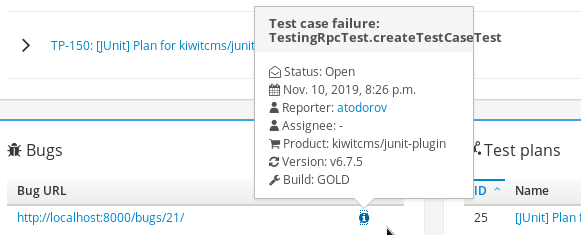
Option #1: using the caching layer
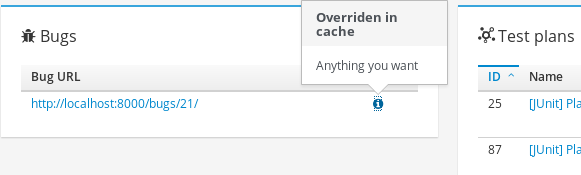
Additional bug information is cached on the application layer. The cache
key is the bug URL! By default Kiwi TCMS uses local-memory caching which
isn't accessible for external processes but can be reconfigured very easily.
This example changes the CACHES setting to use a directory on the
file system like so
CACHES = {
    'default': {
        'BACKEND': 'django.core.cache.backends.filebased.FileBasedCache',
        'LOCATION': '/tmp/kiwi-cache',
        'TIMEOUT': 3600,
    }
}
Then you need to poll your 3rd party bug tracker (and/or other systems) and update the cache for each URL
from django.core.cache import cache
from tcms.core.contrib.linkreference.models import LinkReference

for reference in LinkReference.objects.filter(is_defect=True):
    # possibly filter objects coming only from your own bug tracker
    # in case there are multiple trackers in use

    # custom methods to grab more information. Must return strings
    title = fetch_title_from_bug_tracker(reference.url)
    description = fetch_description_from_bug_tracker(reference.url)

    # store the information in Kiwi TCMS cache
    cache.set(reference, {'title': title, 'description': description})
Then execute the Python script above regularly. For example use the following as your cron script
#!/bin/bash
export VIRTUAL_ENV=/venv
export PATH=/venv/bin:${PATH}
cat /path/to/cache_updater.py | /Kiwi/manage.py shell
IMPORTANT
- Kiwi TCMS expires cache entries after an hour. Either change
the
TIMEOUTsetting shown above or run your script more frequently - How to modify default Kiwi TCMS settings is documented here
- The Python + Bash scripts above don't need to be on the same system where Kiwi TCMS is hosted. However they need the same Python 3 virtualenv and cache settings as Kiwi TCMS does
- Information about Django's cache framework and available backends can be found here
memcachedis a supported cache backend option, see here- django-elasticache is a backend for Amazon ElastiCache which provides several configuration examples
- Both django-redis and django-redis-cache are good libraries which support Redis
- Any 3rd party libraries must be
pip3 install-ed into your own docker image
Option #2: extend bug tracker integration
Let's say you are already running a customized Docker image of Kiwi TCMS. Then
you may opt-in to extend the existing bug tracker integration code which provides
the information shown in the tooltip. In this example I've extended the
KiwiTCMS bug tracker implementation but you can even provide your own from
scratch
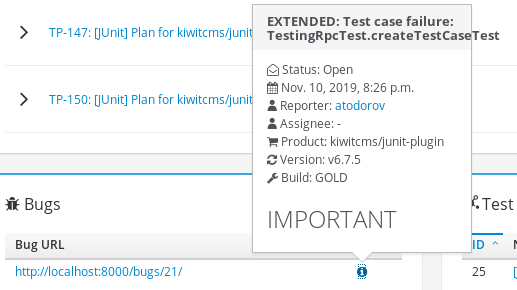
class ExtendedBugTracker(KiwiTCMS):
    def details(self, url):
        result = super().details(url)

        result['title'] = 'EXTENDED: ' + result['title']
        result['description'] += '<h1>IMPORTANT</h1>'

        return result
Then import the new ExtendedBugTracker class inside
tcms/issuetracker/types.py like so
index 9ad90ac..2c76621 100644
--- a/tcms/issuetracker/types.py
+++ b/tcms/issuetracker/types.py
@@ -17,6 +17,9 @@ from django.conf import settings

 from tcms.issuetracker.base import IssueTrackerType
 from tcms.issuetracker.kiwitcms import KiwiTCMS  # noqa
+from tcms.issuetracker.kiwitcms import ExtendedBugTracker
and change the bug tracker type, via https://tcms.example.com/admin/testcases/bugsystem/, to ExtendedBugTracker.
IMPORTANT
- ExtendedBugTracker may live anywhere on the filesystem but Python must be able to import it
- It is best to bundle all of your customizations into a Python package and
pip3 installit into your customized docker image - ExtendedBugTracker must be imported into
tcms/issuetracker/types.pyin order for the admin interface and other functions to find it. You may also place the import at the bottom oftcms/issuetracker/types.py - API documentation for bug tracker integration can be found here
- Rebuilding the docker image is outside the scope of this article. Have a look at this Dockerfile for inspiration
NOTE: starting with Kiwi TCMS v8.5
external bug tracker integration classes are listed in the EXTERNAL_BUG_TRACKERS
setting. If you are using v8.5 or newer instead of
importing ExtendedBugTracker in tcms/issuetracker/types.py you should
override the list of available bug tracker integrations:
EXTERNAL_BUG_TRACKERS.append('mymodule.ExtendedBugTracker')
Happy testing!